
Everything probably still feels rather new: your workplace, the faces around you, and all the information coming at you.
There are over 40.000 colleagues worldwide at bnode, all of whom are here to help you. You will be part of a congenial, close-knit group here and will get the space to discover your talents and seize opportunities.
But first, we will fully immerse you in our company. We promise that you will soon feel right at home! Are you ready?

bnode is more than a postal company and logistics partner. We are an international player in e-commerce logistics with one goal: to connect people in a changing world. To achieve this, we fully commit to quality, customer focus, digitalisation, and innovation. Discover what bnode stands for.
We'd like to inform you about how best to handle some practical matters during your first few days.

Need help from our IT colleagues, or maybe some office supplies or to collect a parcel? Then visit our One Stop Shop. The OSS is on the third floor, next to the cafeteria. Read more

Your laptop will be waiting for you at the One Stop Shop. Your buddy or supervisor will be happy to guide you. Tip: make an appointment so you won't have to wait.

We will have a temporary badge ready for you on your first day. Be sure to stop by the One Stop Shop during your first few days so they can take a nice photo for your permanent badge. You will be able to collect it in around three weeks.

You can safely store your personal belongings in one of the lockers in your department. The step-by-step instructions to apply for it can be found here.

You can find your car, fuel card and parking card with our colleagues from Fleet on the first floor on the B side. Your supervisor should have scheduled an appointment with them so that you can stop by on the afternoon of your first day at work.

To transfer your number, you need to follow the instructions you received via email from our partner Mobitel. More info can be found at the bottom of our FAQs or from IT colleagues in the One Stop Shop.
A new job means new ways of doing things, and we want to make sure you get off to a great start.
We work with flex desks at bnode. Each department has its homebase. Your supervisor or buddy will be happy to tell you more about it. You can find the overview here. Also be sure to read the internal rules so that everything goes smoothly.

Food is only allowed in the coffee corners and the third-floor cafeteria.

Flexible working is based on mutual trust. Depending on the arrangements within your team and if your work allows, you can work from home for a few days. Discuss this with your supervisor and fill in the application form at bpost4me.

You can safely park your bike in our bike parking facility. This can only be accessed with your bnode badge. You can also charge your electric bike and use the showers and changing rooms. The entrance to the shared Multi (floor +0) bicycle parking is on Rue de l'Evêque.

You do not usually need a VPN when working from home. Should you still need to log in, you can easily do so via the BIG-IP Edge Client found on the Windows Start menu.

You can create a Wi-Fi account for your smartphone via guestsponsor.bpost.be. It will expire after 90 days, and you will receive a reminder to renew your account.

First things first: we respect your work-life balance, so you are under no obligation to do this. But if you would like to access your emails and Teams on your smartphone, we recommend installing the Microsoft Authenticator app first, after which you can install the Outlook and Teams apps. You can then log in with your Bpost login details.

Do you have a document that needs to be translated or a video that needs subtitles, or are you looking for an interpreter for an important meeting or event? Then you can turn to our colleagues in the translation service. Request

There are a lot of us at bnode, a whole lot. To help you on your way, the contact details and the organisation within which a colleague works can be found in Teams. Bpost4me also has a guide to who is who help you get started with finding the colleague you are looking for.

Booking meeting rooms is easy via Outlook. Using the roomfinder, you can immediately see which meeting rooms are available and their capacity. At the start of your meeting, remember to check in on the screen next to the door, otherwise your room will be released after 15 minutes. Read more

Planning a meeting with an external partner? Then you can pre-register your visitor via the Proxy Click option in your Outlook calendar. This helps ensure that everything goes smoothly when they check in with the Hospitality Team. More information

Do you want to hand over something to a colleague but you will not be in the office on the same day? No problem, you can use our internal parcel locker for that. It is located in the common area on the first floor of the Multi.

If you have incurred expenses as a function of your job, you can submit an expense report to claim reimbursement. Find more info on how to do that and the template at bpost4me.

bnode continues to grow and is always looking for new colleagues. And that's where you can help us as an ambassador. Do you happen to know the perfect candidate for one of our positions? Be sure to let us know. For certain positions, it could earn you an allowance of up to €1,000. More information
Thanks to Actisoc Online, you can enjoy a wide range of discounts and benefits from hundreds of partners: from discounts at online shops to discounted tickets for the cinema or amusement parks. Discover Actisoc
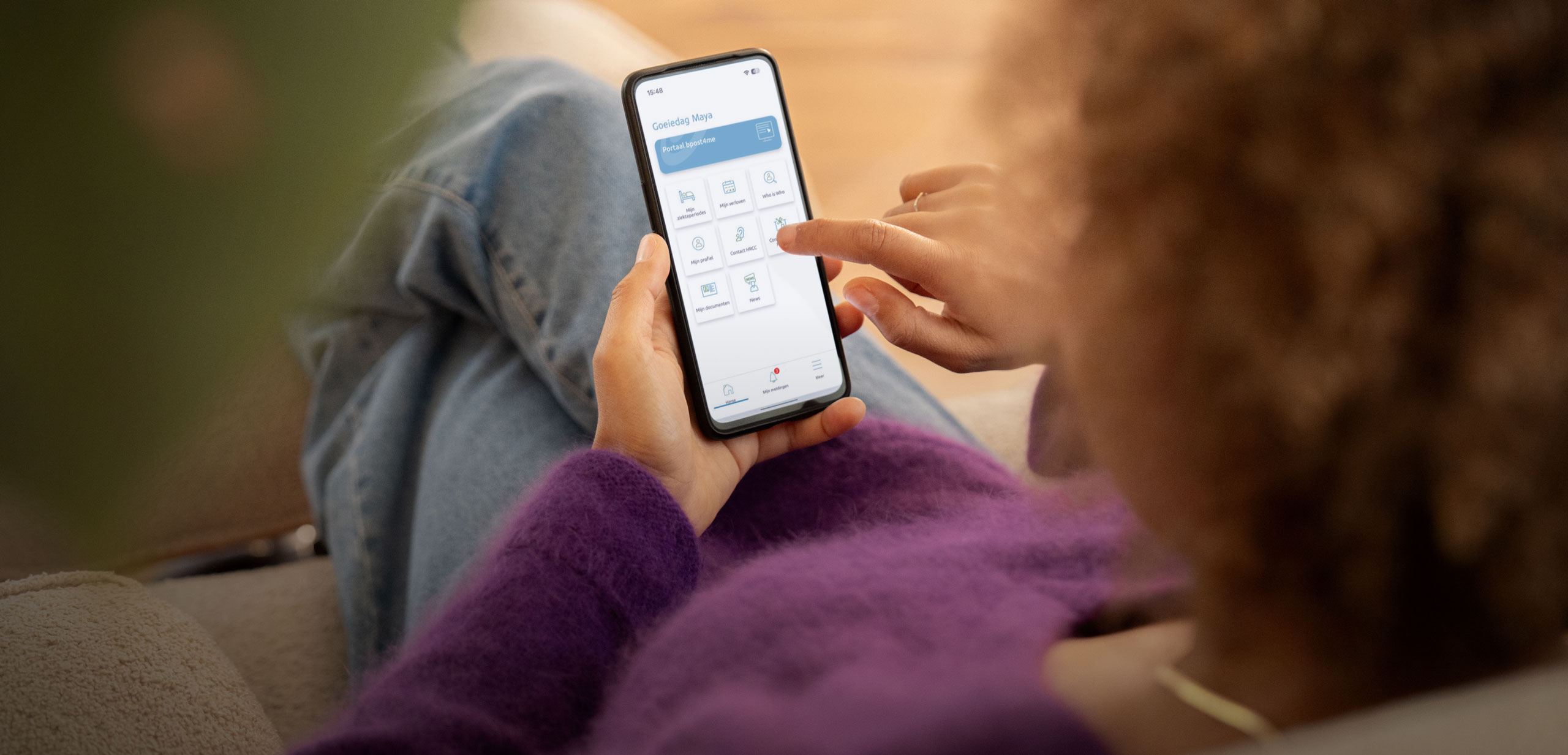
bpost4me is your trusted guide throughout your career. You will always find the latest news about our organisation as well as all the HR info. This is where you can request holidays, report an illness, check internal vacancies, consult pay and benefits, check rules and regulations, keep track of your personal documents and more.
bpost4me can be accessed via the web portal or the app. In your first few days at bnode, you will receive an email inviting you to install Bpost4me app.
bnode never stands still. That is why we give you plenty of opportunities to get to know our company and for personal development.
Grab a coffee and settle in for a welcome session at our head office. Over the course of an hour, we share the initial ins and outs. You can also ask questions. You will automatically receive an invitation for this.
You will be immersed in our company for half a day and meet other colleagues who have also just started. Keep an eye on your mailbox for the invitation.
Your supervisor schedules an onboarding process so that you get to know your job, your colleagues, and other key people. If you have any questions about your job or your department, you can always contact your supervisor.
You will spend a week shadowing a mail carrier, in the Post Office and becoming familiar with the sorting center. So you will get to know how things work at bnode.
You will receive an invitation to an e-learning about our Code of Conduct: how we treat one another and our materials, about GDPR, AI, IT guidelines and more. You must do this within your first two weeks.
Growth opportunities abound at bnode. There is plenty to discover during the first weeks, but we think it is important for you to be able to continue to learn and grow in the following weeks, months, and years of your career.
We use a Performance Management Process. This means that you and your supervisor discuss your goals for the coming year and what you need to achieve them (for example, training). This will give you clear insight into your priorities. Two evaluations follow this: in the middle and at the end of the year. This allows you to adjust the growth path in time where necessary.
Questions? Please contact your supervisor or check bpost4me.

Tu viens à peine d’arriver, donc ce n’est pas encore le moment, mais nous voulons t’encourager à saisir toutes les opportunités présentes. Cela peut par exemple passer par une candidature interne pour un poste dans un autre service ou une autre fonction.
At bnode, everyone is welcome and everyone is equal. That is why we are committed to creating a respectful, inclusive working environment where everyone feels valued. We count on you doing the same! We have various communities working on diversity and inclusion that you can join.

Wondering about the template for your new email signature? You can find it in our online house style guide. This is a compilation of everything you need to know about our company house style, from templates for your documents to photos and video material. In short, it's everything you need to align your communication with our house style. Spoiler alert: Bpost and bnode are always written in lower case, even at the beginning of a sentence.
| 00XXX 0000 13:00 CET |
Welcome Session – Short welcome session for new colleagues (45-60 min)
Welcome Session |
Add to your calendar |
| 00XXX 0000 13:00 CET |
Welcome Day – Comprehensive informational gathering where we immerse you in the world of bnode
Welcome day |
Add to your calendar |
Experiencing problems with your hardware or software? You can always contact our IT colleagues via the 'AskIT' help desk, which can be easily found using the Windows menu on your bnode computer. You can also call 02 207 55 21 or drop by the One Stop Shop.
The 'HP Follow me' printer is automatically installed on your bnode computer. If you want to print something, just choose this printer and unlock a nearby printer with your badge. This works at all bnode sites. Easy, right?
Oops, that should not happen. Normally, all necessary access is pre-arranged. If this is not the case, pleases contact your supervisor, who can also tell you which mailing lists, tools, and Teams you should definitely have access to. IT can then help you rectify this.
A temporary badge will be ready on your first day of work. You will then also get an invitation to stop by the One Stop Shop, where you can have a nice photo taken for your personalised badge. Please be aware that it will take around three weeks for your permanent badge to be ready.
Any questions about your badge? Contact multi.reception@bnode.be for access to the head office. For our other locations, please contact Security Badging on site.
For questions about ordering a car, the contract, or insurance, please contact our colleagues in Fleet at fleet.management@bpost.be. Do you have a question about your car itself, damage or an accident? If so, contact the leasing company directly.
Be sure to read our car policy for more info.
Our colleagues in Fleet are at your service via fleet.management@bpost.be.
Please check that you correctly requested your card via your onboarding form. Did you miss this part? No problem, just contact our colleagues in Fleet and they will sort out your card.
It could also be that there was not enough time between your request and your start date. It can take up to three weeks after your request to get your parking card.
In the meantime, we will refund your parking costs. To claim these costs, fill in an expense report.
There are various car parks near the head office, including Interparking De Brouckère which gives you direct access to our buildings via the "De Brouckère exit" lift.
Private parking is provided at our sorting centers.
Your electric company car also comes with a charging station installed at your home. The leasing company will contact you about this.
The leasing company provides a standard package to install your charging station. If you need extras, such as a longer cable, you pay for this yourself. You will receive a quote in advance.
The electricity you use at home for charging your vehicle will be reimbursed to you via your leasing company's charging card.
More information can be found in our Car Policy (section 5).
Charging stations are provided both in the centre of Brussels and at our sorting centers.
Your family members and partner living under the same roof may drive your company car at any time. Colleagues may use your company car to carry out bnode duties. If other people want to drive your car, you must always be present.
Oh no! You can contact our colleagues at Fleet via fleet.management@bpost.be.
You can also opt for a public transport subscription as part of your mobility budget. If you requested a subscription via your onboarding form, we will provide you with a certificate to arrange this with SNCB-NMBS, STIB-MIVB or De Lijn.
Have you not received a certificate? Contact the HR Contact Center at bpost4me. Be sure to read the brochure on My Benefits with Choice, which has more info on mobility.
You can safely park your bike in our secure bike parking facility. This can only be accessed with your bnode badge. You can also charge your electric bike and use the showers and changing rooms.
We have compiled all the information on bpost4me.
Yes, your hospitalisation insurance commences on your first working day at bnode.
Once AG Insurance clears your registration, you will receive a letter at home. This can take up to two months. Still haven't received anything by post after that period? Then contact AG Insurance at myglobalbenefits.be.
You can find all the information, brochures and contracts at bpost4me.
Any questions about joining or cancelling should be directed to our HR colleagues through the HR Contact Center. You can reach them via Bpost4me .
You can do this via www.myglobalbenefits.be , via the AG Health app or by phone at 02 664 11 82 (Dutch) or 02 664 11 83 (French).
The Medi-Assistance service is available 24/7. Call 02 664 89 80 from Belgium or +32 2 664 01 70 from abroad.
Yes, your group insurance with AXA commences on your first working day at bnode. You can find all the information about this at bpost4me.
Like everyone else in Belgium, you are entitled to 20 statutory holidays if you work full-time. At bnode, you get seven extra-statutory leave days on top of that. You can see how much leave you have left via bpost4me.
Employees with office jobs are entitled to extra-statutory days, five of which are on fixed days (DAD).
Mail & Parcels Operations
Retail & Banking
BU Bene Last Mile
You may take your extra-statutory leave days of choice on the dates mentioned above.
Other support services
You are required to take at least five days of leave between 1 July and 31 August.
Not sure which dates apply to you? Check with your supervisor.
You can arrange that via Bpost4me. Go to 'myself'.
Tip: enter the five fixed DAD days yourself at the beginning of the year. If you do not do this, they will automatically be scheduled with your extra-statutory leave.
Good to know: extra-statutory leave days can sometimes be carried over to the next calendar year. This is not possible for statutory leave days.
Have you already given the holiday certificate from your previous employer to our HR department? They will then calculate how many holidays you can still take. Contact the HR Contact Center via Bpost4me for more info.
Check whether the FAQs on bpost4me provide an answer to your question. If not, HRCC colleagues will be happy to help you.
As previously mentioned, the meal vouchers (8 euros per day worked) are loaded onto your personal Pluxee card (formerly Sodexo) on the 10th day of the following month.
When will I receive my meal vouchers card?
If you already have such a card from your previous employer, you can continue using it. Don't have a card yet? Then keep an eye on your letterbox. You will receive your card on the 10th day of the following month after your first day of work. For example, if you start at bnode in January, you will receive your Pluxee card mid-February.
You made your initial choices before you started at bnode. You can adjust your fringe benefits annually twice per year: in March and September.
During these times, we organise a webinar that brings together all the information. You will receive an invitation for this in advance.
bpost4me also has a lot of information about My Benefits My Choice.
Depending on your position, you are entitled to a Proximus smartphone subscription, including unlimited calls and texts to EU countries and 25 GB of mobile data.
The onboarding form includes an option to indicate that you want to keep your existing phone number. If you selected this, you should have received an email from our partner Mobitel with the steps to follow. Did you not receive an email? Check your spam folder. Our IT colleagues at the One Stop Shop can always help you with this too.
Did something go wrong or do you have questions? Our IT colleagues will be happy to help you via MB_ICT_MobilophonyTeam@bpost.be.
That was a lot to take in. Still have questions? Do you need clarification about anything? Be sure to let us know and we will figure it out together.
Send an email to HRCC@bpost.be or call 02 278 50 50.
Contact the 'AskIT' help desk or visit the One Stop Shop.
Contact AG Insurance at 02/664 11 82 or servicecenterhc@aginsurance.be
Contact AXA Insurance at life.eb@axa.be or 02/622 86 82
For questions about your company car contract or parking: contact fleet.management@bpost.be
For questions about the car itself, damage or charging stations: contact the leasing company.
Contact multi.reception@bpost.be